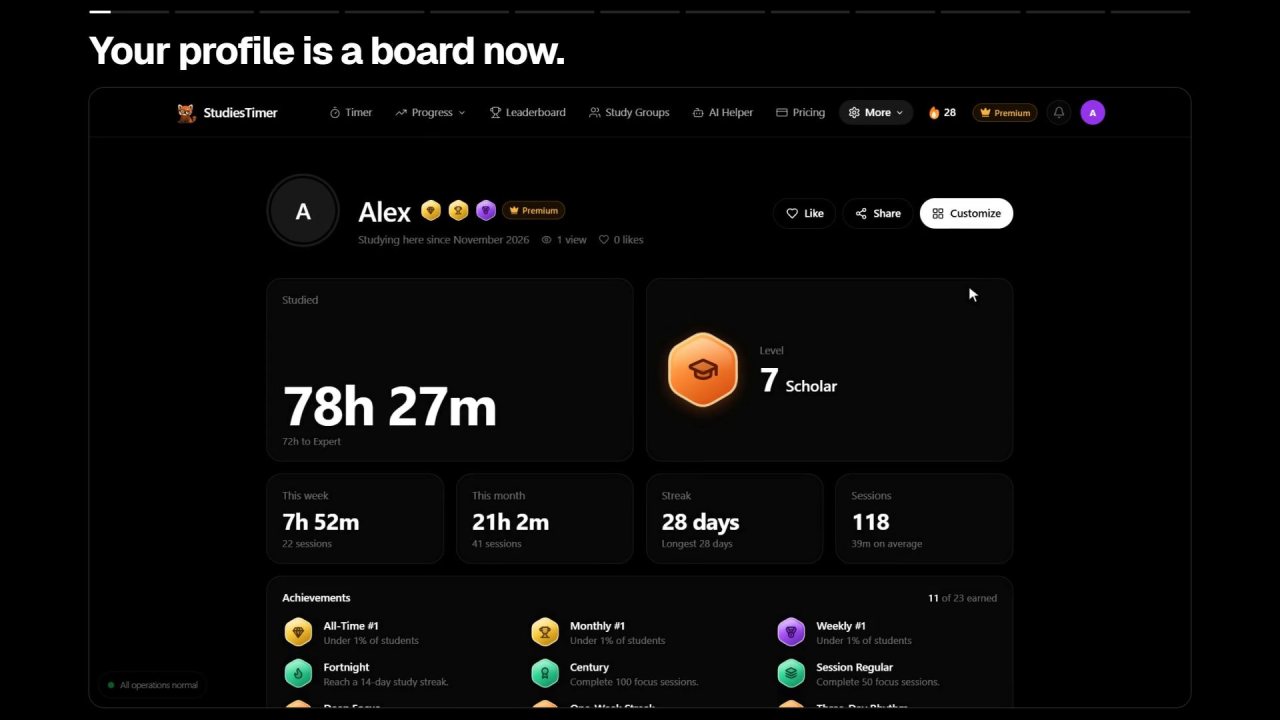
The biggest StudiesTimer update so far is live on the web. Almost every page was rebuilt to show less text and more of your own work, and several things are new: a profile you arrange yourself, a study helper that reads your planner before it answers, and a weekly race for your study group. Everything below is on studiestimer.com now, on the same account you already use.
Watch the one-minute tour
Your profile is a board now
Your public profile shows your hours, level, streak, medals, subjects and goals as blocks on one page, with your best medals beside your name. You can take off any block you would rather keep to yourself.
The Share button makes a picture of the whole profile, a tall one sized for stories, or a single medal card. You can also copy a link. Anyone with the link sees the profile without needing an account.
A study helper that reads your planner first
The AI helper used to start from a blank chat. Now it opens on what is due, and when you ask something it looks at your planner, your goals and your recent study time before it answers. You can see each thing it reads while it works.
When it suggests a change, such as adding a plan for tomorrow or starting a 50 minute block, it shows the change as a row with a button. Nothing happens until you press it. Quizzes, flashcards, PDFs and photos work as they did.
Race your study group every week
Every study group now has a weekly race. The three members with the most study time stand on a podium, everyone else sees how far they are from the next place, and the race starts again each Monday. A small dot shows who has already studied today, and you can nudge a member who has not.
The group chat has reactions, and starting a study room takes one screen: the room's name and every Pomodoro setting are in front of you, and "Start the room" opens the shared timer for everyone.
Medals, a lighter planner and new timer looks
Achievements are medals now, with a rarity that shows how many students hold each one and a short list of the three you are closest to earning. The planner shows one month, the plans for the day you pick, and a box to tick when a plan is done.
The timer has a Style button. Classic or flip digits work on the timer, the clock, Pomodoro and the stopwatch, and three looks (Studio, Mono and Paper) are free. Full screen hides everything except the time.
What Premium adds
- Your profile, your way. Move the blocks, size them, color them, add a cover and write a status. It is edited on the page itself, so what you see is what visitors get.
- Every timer look. Ember, Solari, Blossom and Sage join the three free looks.
- Charts of where your hours go. Analytics shows each subject's share of the week and your study time day by day.
- Charts for your study group. See who carried the week and how the group's hours add up by day.
The pricing page has the current plans. Nothing that was free before this update became paid.
Five minutes to try it
- Open your profile and press Share to see it as a picture.
- Open the AI helper and ask it to plan your evening around what is due.
- Open a study group and check where you stand in this week's race.
- Press Style under the timer and pick a look.
- Start one study block. The streak in the top bar lights up when it is saved.
On the phone
This update is for the website. The iPhone, iPad and Android apps keep working with the same account, and your time, streak and groups stay in step between them. Some of the new pieces, such as chat reactions and the profile board, are on the web first. The mobile app page has the store links.